
R211x-HP Flexfabric 11900 Layer 3 - IP Routing Command Reference
184
Parameters
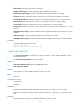
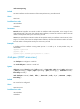
router-id: Specifies the router ID of the neighbor on the virtual link.
dead seconds: Sets the dead interval in the range of 1 to 32768 seconds. The default is 40. The dead
interval must be identical with that on the virtual link neighbor, and at least four times the hello interval.
hello seconds: Sets the hello interval in the range of 1 to 8192 seconds. The default is 10. It must be
identical with the hello interval on the virtual link neighbor.
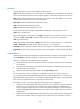
hmac-md5: Specifies the HMAC-MD5 authentication mode.
md5: Specifies the MD5 authentication mode.
simple: Specifies the simple authentication mode.
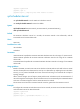
key-id: Specifies the key ID for MD5 or HMAC-MD5 authentication, in the range of 1 to 255.
cipher: Sets a ciphertext key.
cipher-string: Specifies a ciphertext key. If simple is specified, the key must be a string of 33 to 41
characters. If md5 or hmac-md5 is specified, the key must be a string of 33 to 53 characters.
plain: Sets a plaintext key.
plain-string: Specifies a plaintext key. If simple is specified, the key must be a string of 1 to 8 characters.
If md5 or hmac-md5 is specified, the key must be a string of 1 to 16 characters.
retransmit seconds: Sets the retransmission interval in the range of 1 to 3600 seconds. The default is 5.
trans-delay seconds: Sets the transmission delay interval in the range of 1 to 3600 seconds. The default
is 1.
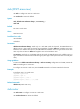
Usage guidelines
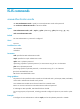
As defined in RFC 2328, all non-backbone areas must maintain connectivity to the backbone. You can
use the vlink-peer command to configure a virtual link to connect an area to the backbone.
When you configure this command, follow these guidelines:
• The smaller the hello interval is, the faster the network converges, and the more network resources
are consumed.
• A retransmission interval that is too small can cause unnecessary retransmissions. A large value is
appropriate for a low speed link.
• Specify an appropriate transmission delay with the trans-delay keyword.
For security purposes, all keys, including keys configured in plain text, are saved in cipher text.
You can specify either MD5/HMAC-MD5 authentication or simple authentication for a virtual link. For
MD5/HMAC-MD5 authentication, you can configure multiple keys by executing this command multiple
times, and each command must have a unique key ID and key string.
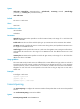
To modify the key of a virtual link, perform the following key rollover configurations:
1. Configure a new MD5/HMAC-MD5 authentication key for the virtual link on the local device. If
the new key is not configured on the neighbor device, MD5/HMAC-MD5 authentication key
rollover is triggered. During key rollover, OSPF sends multiple packets that contain both the new
and old MD5/HMAC-MD5 authentication keys to make sure the neighbor device can pass the
authentication.
2. Configure the new MD5/HMAC-MD5 authentication key on the neighbor device. When the local
device receives packets with the new key from the neighbor device, it exits MD5 key rollover.