
R211x-HP Flexfabric 11900 Layer 3 - IP Routing Command Reference
11
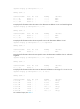
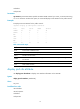
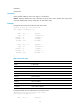
Protocol: Direct Process ID: 0
SubProtID: 0x1 Age: 04h20m37s
Cost: 0 Preference: 0
Tag: 0 State: Active Adv
OrigTblID: 0x0 OrigVrf: default-vrf
TableID: 0x2 OrigAs: 0
NibID: 0x10000003 LastAs: 0
AttrID: 0xffffffff Neighbor: 0.0.0.0
Flags: 0x1008c OrigNextHop: 1.1.1.2
Label: NULL RealNextHop: 1.1.1.2
BkLabel: NULL BkNextHop: N/A
Tunnel ID: Invalid Interface: Vlan-interface2
BkTunnel ID: Invalid BkInterface: N/A
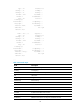
For command output, see Table 2.
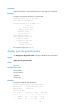
display ip routing-table protocol
Use display ip routing-table protocol to display information about routes installed by a protocol.
Syntax
display ip routing-table [ vpn-instance vpn-instance-name ] protocol protocol [ inactive | verbose ]
Views
Any view
Predefined user roles
network-admin
network-operator
mdc-admin
mdc-operator
Parameters
vpn-instance vpn-instance-name: Specifies MPLS L3VPN instance by its name, a case-sensitive string of
1 to 31 characters. Without this option, the command displays routing information for the public network.
protocol: Specifies a routing protocol. It can be bgp, direct, isis, ospf, rip, or static.
inactive: Displays information about inactive routes. Without this keyword, the command displays
information about both active and inactive routes.
verbose: Displays detailed routing table information. Without this keyword, the command displays brief
routing information.
Examples
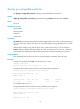
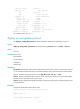
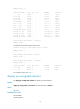
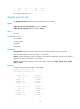
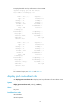
# Display brief information about direct routes.
<Sysname> display ip routing-table protocol direct
Summary Count : 13
Direct Routing Table Status : <Active>