
R211x-HP Flexfabric 11900 Layer 3 - IP Routing Command Reference
12
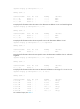
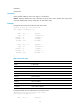
Summary Count : 13
Destination/Mask Proto Pre Cost NextHop Interface
0.0.0.0/32 Direct 0 0 127.0.0.1 InLoop0
2.2.2.0/24 Direct 0 0 2.2.2.1 Vlan2
2.2.2.0/32 Direct 0 0 2.2.2.1 Vlan2
2.2.2.2/32 Direct 0 0 127.0.0.1 InLoop0
2.2.2.255/32 Direct 0 0 2.2.2.1 Vlan2
127.0.0.0/8 Direct 0 0 127.0.0.1 InLoop0
127.0.0.0/32 Direct 0 0 127.0.0.1 InLoop0
127.0.0.1/32 Direct 0 0 127.0.0.1 InLoop0
127.255.255.255/32 Direct 0 0 127.0.0.1 InLoop0
192.168.80.0/24 Direct 0 0 192.168.80.10 Vlan1
192.168.80.0/32 Direct 0 0 192.168.80.10 Vlan1
192.168.80.10/32 Direct 0 0 127.0.0.1 InLoop0
192.168.80.255/32 Direct 0 0 192.168.80.10 Vlan1
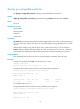
Direct Routing Table Status : <Inactive>
Summary Count : 0
# Display brief information about static routes.
<Sysname> display ip routing-table protocol static
Summary Count : 2
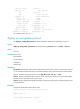
Static Routing Table Status : <Active>
Summary Count : 0
Static Routing Table Status : <Inactive>
Summary Count : 2
Destination/Mask Proto Pre Cost NextHop Interface
1.2.3.0/24 Static 60 0 1.2.4.5 Vlan10
3.0.0.0/8 Static 60 0 2.2.2.2 Vlan1
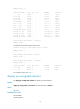
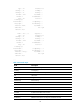
For command output, see Table 1.
display ip routing-table statistics
Use display ip routing-table statistics to display IPv4 route statistics.
Syntax
display ip routing-table [ vpn-instance vpn-instance-name ] statistics
Views
Any view
Predefined user roles
network-admin
network-operator