
R211x-HP Flexfabric 11900 Layer 3 - IP Routing Command Reference

245
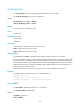
isis timer lsp
NOTE:
This command is not available in loopback interface view.
Use isis timer lsp to configure the minimum interval for sending LSPs on the interface and specify the
maximum number of LSPs that can be sent per time.
Use undo isis timer lsp to restore the default.
Syntax
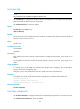
isis timer lsp time [ count count ]
undo isis timer lsp
Default
The minimum interval for sending LSPs on the interface is 33 milliseconds, and the maximum number of
LSPs that can be sent at a time is 5.
Views
Interface view
Predefined user roles
network-admin
mdc-admin
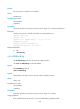
Parameters
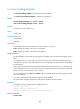
time: Specifies the minimum interval in milliseconds for sending link-state packets, in the range of 1 to
1000.
count: Specifies the maximum number of link-state packets to be sent at one time, in the range of 1 to
1000.
Usage guidelines
If a change occurs in the LSDB, IS-IS advertises the changed LSP to neighbors. You can specify the
minimum interval for sending these LSPs.
Configure a proper LSP retransmission interval to avoid unnecessary retransmissions.
Examples
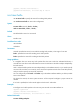
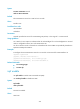
# Configure the interval as 500 milliseconds for sending LSPs on interface VLAN-interface 10.
<Sysname> system-view
[Sysname] interface vlan-interface 10
[Sysname-Vlan-interface10] isis timer lsp 500
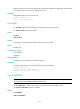
Related commands
isis timer retransmit
isis timer retransmit
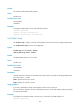
Use isis timer retransmit to configure the interval for retransmitting LSP packets over a point-to-point link.
Use undo isis timer retransmit to restore the default.