
R211x-HP Flexfabric 11900 Layer 3 - IP Routing Command Reference


274
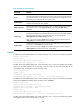
mdc-admin
Usage guidelines
By default, BGP does not compare MEDs for routes from the same AS. When a router learns a new route,
it compares the route with the optimal route in its BGP routing table. If the new route is more optimal, it
becomes the optimal route in the BGP routing table. In this way, route learning sequence might affect
optimal route selection.
With the bestroute compare-med command configured, the router puts routes received from the same AS
into a group. The router then selects the route with the lowest MED from the same group, and compares
routes from different groups. This mechanism avoids the above-mentioned problem.
If the bestroute compare-med and balance commands are configured at the same time, the balance
command does not take effect.
Examples
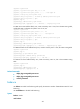
# In BGP IPv4 unicast address family view, enable MED comparison for routes on a per-AS basis.
<Sysname> system-view
[Sysname] bgp 100
[Sysname-bgp] address-family ipv4 unicast
[Sysname-bgp-ipv4] bestroute compare-med
# In BGP-VPN IPv4 unicast address family view, enable MED comparison for routes on a per-AS basis.
<Sysname> system-view
[Sysname] bgp 100
[Sysname-bgp] ip vpn-instance vpn1
[Sysname-bgp-vpn1] address-family ipv4 unicast
[Sysname-bgp-ipv4-vpn1] bestroute compare-med
# In BGP IPv6 unicast address family view, enable MED comparison for routes on a per-AS basis.
<Sysname> system-view
[Sysname] bgp 100
[Sysname-bgp] address-family ipv6 unicast
[Sysname-bgp-ipv6] bestroute compare-med
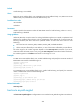
bestroute med-confederation
Use bestroute med-confederation to enable MED comparison for routes received from confederation
peers.
Use undo bestroute med-confederation to restore the default.
Syntax
bestroute med-confederation
undo bestroute med-confederation
Default
MED comparison is disabled for routes received from confederation peers.
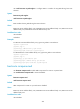
Views
BGP IPv4 unicast address family view, BGP-VPN IPv4 unicast address family view, BGP IPv6 unicast
address family view