
R211x-HP Flexfabric 11900 Layer 3 - IP Routing Command Reference

343
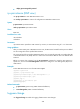
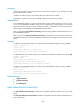
By default, the preference of an EBGP route is lower than a local route. If a device has an EBGP route and
a local route to reach the same destination, the device does not select the EBGP route. You can use the
network shortcut command to configure the EBGP route to have the same preference as the local route
so the EBGP route is more likely to become the optimal route.
You can use the preference command to modify the preferences for external and local BGP routes.
Examples
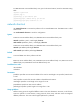
# In BGP IPv4 unicast address family view, increase the preference of EBGP route 10.0.0.0/16.
<Sysname> system-view
[Sysname] bgp 100
[Sysname-bgp] address-family ipv4 unicast
[Sysname-bgp-ipv4] network 10.0.0.0 255.255.0.0 short-cut
# In BGP-VPN IPv6 unicast address family view, increase the preference of EBGP route 10::/16.
<Sysname> system-view
[Sysname] bgp 100
[Sysname-bgp] ip vpn-instance vpn1
[Sysname-bgp-vpn1] address-family ipv6 unicast
[Sysname-bgp-ipv6-vpn1] network 10:: 16 short-cut
Related commands
preference
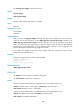
peer advertise-community
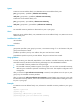
Use peer advertise-community to advertise the COMMUNITY attribute to a peer or peer group.
Use undo peer advertise-community to disable the COMMUNITY attribute advertisement to a peer or
peer group.
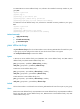
Syntax
In BGP IPv4 unicast address family view/BGP-VPN IPv4 unicast address family view/BGP VPNv4
address family view:
peer { group-name | ip-address } advertise-community
undo peer { group-name | ip-address } advertise-community
In BGP IPv6 unicast address family view:
peer { group-name | ipv6-address } advertise-community
undo peer { group-name | ipv6-address } advertise-community
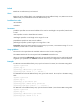
Default
No COMMUNITY attribute is advertised to any peer or peer group.
Views
BGP IPv4 unicast address family view, BGP-VPN IPv4 unicast address family view, BGP VPNv4 address
family view, BGP IPv6 unicast address family view
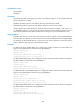
Predefined user roles
network-admin
mdc-admin