
R211x-HP Flexfabric 11900 Layer 3 - IP Routing Command Reference
374
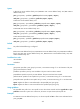
[Sysname-bgp-ipv6] peer test next-hop-local
peer password
Use peer password to enable MD5 authentication for a BGP peer or peer group.
Use undo peer password to remove MD5 authentication for the BGP peer or peer group.
Syntax
peer { group-name | ip-address | ipv6-address } password { cipher | simple } password
undo peer { group-name | ip-address | ipv6-address } password
Default
MD5 authentication is disabled.
Views
BGP view, BGP-VPN instance view
Predefined user roles
network-admin
mdc-admin
Parameters
group-name: Specifies a peer group by its name, a case-sensitive string of 1 to 47 characters. The peer
group must have been created.
ip-address: Specifies a peer by its IP address. The peer must have been created.
ipv6-address: Specifies a peer by its IPv6 address. The peer must have been created.
cipher: Sets a ciphertext password.
simple: Sets a plaintext password.
password: Specifies a password, a case-sensitive string of 33 to 137 characters in cipher text, or 1 to 80
characters in plain text.
Usage guidelines
You can enable MD5 authentication to enhance security using the following methods:
• Perform MD5 authentication when establishing TCP connections. Only the two parties that have the
same password configured can establish TCP connections.
• Perform MD5 calculation on TCP segments to avoid modification to the encapsulated BGP packets.
For security purposes, all passwords, including passwords configured in plain text, are saved in cipher
text.
Examples
# In BGP view, perform MD5 authentication on the TCP connection between the local router 10.1.100.1
and the peer router 10.1.100.2, and set the plaintext authentication password to aabbcc.
<Sysname> system-view
[Sysname] bgp 100
[Sysname-bgp] peer 10.1.100.2 password simple aabbcc
# Perform similar configuration on the peer.
<Sysname> system-view