
R211x-HP Flexfabric 11900 Layer 3 - IP Routing Command Reference
434
maximum load-balancing
Use maximum load-balancing to specify the maximum number of equal-cost multi-path (ECMP) routes for
load balancing.
Use undo maximum load-balancing to restore the default.
Syntax
maximum load-balancing number
undo maximum load-balancing
Views
RIPng view
Predefined user roles
network-admin
mdc-admin
Parameters
number: Specifies the maximum number of ECMP routes. When this argument is set to 1, RIPng does not
perform load balancing.
Usage guidelines
The value range for the number argument and the default setting depend on the max-ecmp-num
command.
If you set the maximum number of ECMP routes to m by using the max-ecmp-num command, the number
argument in the maximum load-balancing command is in the range of 1 to m and defaults to m.
Examples
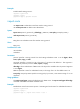
# Specify the maximum number of ECMP routes as 2.
<Sysname> system-view
[Sysname] ripng 100
[Sysname-ripng-100] maximum load-balancing 2
Related commands
max-ecmp-num
preference
Use preference to specify the preference for RIPng routes.
Use undo preference to restore the default.
Syntax
preference [ route-policy route-policy-name ] value
undo preference
Default
The preference of RIPng routes is 100.