
R211x-HP Flexfabric 11900 Layer 3 - IP Routing Command Reference
440
Views
Interface view
Predefined user roles
network-admin
mdc-admin
Examples
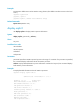
# Enable the poison reverse function for RIPng update messages on VLAN-interface 100.
<Sysname> system-view
[Sysname] interface vlan-interface 100
[Sysname-Vlan-interface100] ripng poison-reverse
ripng split-horizon
Use ripng split-horizon to enable the split horizon function.
Use undo ripng split-horizon to disable the split horizon function.
Syntax
ripng split-horizon
undo ripng split-horizon
Default
The split horizon function is enabled.
Views
Interface view
Predefined user roles
network-admin
mdc-admin
Usage guidelines
The split horizon function prevents routing loops. If you want to disable this function, make sure the
operation is indispensable.
If both poison reverse and split horizon are enabled, only the poison reverse function takes effect.
Examples
# Enable the split horizon function on VLAN-interface 100.
<Sysname> system-view
[Sysname] interface vlan-interface 100
[Sysname-Vlan-interface100] ripng split-horizon
ripng summary-address
Use ripng summary-address to configure a summary network to be advertised through the interface.
Use undo ripng summary-address to remove the summary.