
R211x-HP Flexfabric 11900 Layer 3 - IP Routing Configuration Guide

96
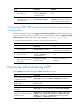
Task Command
Reset an OSPF process. reset ospf [ process-id ] process [ graceful-restart ]
Re-enable OSPF route
redistribution.
reset ospf [ process-id ] redistribution
OSPF configuration examples
These configuration examples only cover commands for OSPF configuration.
Basic OSPF configuration example
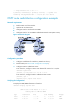
Network requirements
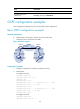
• Enable OSPF on all switches, and split the AS into three areas.
• Configure Switch A and Switch B as ABRs.
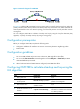
Figure 22 Network diagram
Configuration procedure
1. Configure IP addresses for interfaces. (Details not shown.)
2. Enable OSPF:
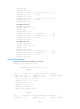
# Configure Switch A.
<SwitchA> system-view
[SwitchA] router id 10.2.1.1
[SwitchA] ospf
[SwitchA-ospf-1] area 0
[SwitchA-ospf-1-area-0.0.0.0] network 10.1.1.0 0.0.0.255
[SwitchA-ospf-1-area-0.0.0.0] quit
[SwitchA-ospf-1] area 1
[SwitchA-ospf-1-area-0.0.0.1] network 10.2.1.0 0.0.0.255
[SwitchA-ospf-1-area-0.0.0.1] quit
[SwitchA-ospf-1] quit
# Configure Switch B.
<SwitchB> system-view
[SwitchB] router id 10.3.1.1
Area 0
Area 1
Area 2
Switch C
Vlan-int100
10.1.1.2/24
Vlan-int100
10.1.1.1/24
Vlan-int300
10.4.1.1/24
Vlan-int200
10.2.1.2/24
Switch B
Vlan-int200
10.3.1.1/24
Vlan-int200
10.3.1.2/24
Switch A
Vlan-int200
10.2.1.1/24
Vlan-int300
10.5.1.1/24
Switch D