
R211x-HP Flexfabric 11900 Layer 3 - IP Routing Configuration Guide


143
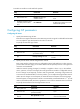
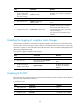
Ste
p
Command
Remarks
1. Enter system view.
system-view N/A
2. Enter IS-IS view.
isis [ process-id ] [ vpn-instance
vpn-instance-name ]
N/A
3. Configure the SPF
calculation interval.
timer spf maximum-interval
[ minimum-interval [ incremental-interval ] ]
By default:
• The maximum interval is 5
seconds.
• The minimum interval is 50
milliseconds.
• The incremental interval is
200 milliseconds.
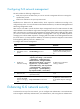
Configuring convergence priorities for specific routes
A topology change causes IS-IS routing convergence. To improve convergence speed, you can assign
convergence priorities to IS-IS routes. Convergence priority levels are critical, high, medium, and low. The
higher the convergence priority, the faster the convergence speed.
By default, IS-IS host routes have medium convergence priority, and other IS-IS routes have low
convergence priority.
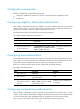
To assign convergence priorities to specific IS-IS routes:
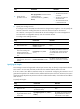
Ste
p
Command
Remarks
1. Enter system view.
system-view N/A
2. Enter IS-IS view.
isis [ process-id ] [ vpn-instance
vpn-instance-name ]
N/A
3. Assign convergence priorities
to specific IS-IS routes.
priority { critical | high | medium }
{ prefix-list prefix-list-name | tag
tag-value }
By default, IS-IS routes, except IS-IS
host routes, have the low
convergence priority.
Setting the LSDB overload bit
By setting the overload bit in sent LSPs, a router informs other routers of failures that make it unable to
select routes and forward packets.
When an IS-IS router cannot record the complete LSDB, for example, because of memory insufficiency,
it will calculate wrong routes. To make troubleshooting easier, temporarily isolate the router from the IS-IS
network by setting the overload bit.
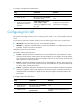
To set the LSDB overload bit:
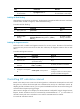
Ste
p
Command
Remarks
1. Enter system view.
system-view N/A
2. Enter IS-IS view.
isis [ process-id ] [ vpn-instance vpn-instance-name ]
N/A