
R211x-HP Flexfabric 11900 Layer 3 - IP Routing Configuration Guide

150
traffic recovery time. Meanwhile, IS-IS calculates the shortest path based on the new network topology,
and forwards packets over the path after network convergence.
You can either enable IS-IS FRR to calculate a backup next hop automatically, or designate a backup next
hop with a routing policy for routes matching specific criteria.
Configuration prerequisites
Before you configure IS-IS FRR, complete the following tasks:
• Configure IP addresses for interfaces to ensure IP connectivity between neighboring nodes.
• Enable IS-IS.
Configuration guidelines
• Do not use FRR and BFD at the same time. Otherwise, FRR might fail to take effect.
• The automatic backup next hop calculation of FRR and that of TE are mutually exclusive.
Configuring IS-IS FRR to automatically calculate a backup next
hop
Ste
p
Command
Remarks
1. Enter system view.
system-view N/A
2. Configure the source address
of echo packets.
bfd echo-source-ip ip-address
By default, the source address of
echo packets is not configured.
3. Enter IS-IS view.
isis [ process-id ] [ vpn-instance
vpn-instance-name ]
N/A
4. Enable IS-IS FRR to
automatically calculate a
backup next hop.
fast-reroute auto By default, IS-IS FRR is disabled.
Configuring IS-IS FRR using a routing policy
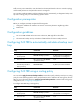
You can use the apply fast-reroute backup-interface command to specify a backup next hop in a routing
policy for routes matching specific criteria, and perform this task to reference the routing policy for IS-IS
FRR. For more information about the apply fast-reroute backup-interface command and routing policy
configurations, see "Configuring routing policies."
T
o configure IS-IS FRR using a routing policy:
Ste
p
Command
Remarks
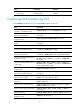
1. Enter system view.
system-view N/A
2. Configure the source address
of echo packets.
bfd echo-source-ip ip-address
By default, the source address of
echo packets is not configured.
3. Enter IS-IS view.
isis [ process-id ] [ vpn-instance
vpn-instance-name ]
N/A