
R211x-HP Flexfabric 11900 Layer 3 - IP Routing Configuration Guide

255
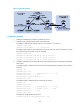
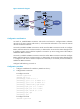
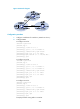
Figure 62 Network diagram
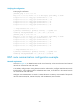
Configuration considerations
On Switch A, establish EBGP connections with Switch B and Switch C. Configure BGP to advertise
network 8.1.1.0/24 to Switch B and Switch C, so that Switch B and Switch C can access the internal
network connected to Switch A.
On Switch B, establish an EBGP connection to Switch A and an IBGP connection to Switch C. Configure
BGP to advertise network 9.1.1.0/24 to Switch A, so that Switch A can access the intranet through Switch
B. Configure a static route to interface loopback 0 on Switch C (or use a routing protocol like OSPF) to
establish the IBGP connection.
On Switch C, establish an EBGP connection to Switch A and an IBGP connection to Switch B. Configure
BGP to advertise network 9.1.1.0/24 to Switch A, so that Switch A can access the intranet through Switch
C. Configure a static route to interface loopback 0 on Switch B (or use another protocol like OSPF) to
establish the IBGP connection.
Configure load balancing on Switch A.
Configuration procedure
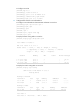
1. Configure IP addresses for interfaces. (Details not shown.)
2. Configure BGP connections:
# Configure Switch A.
<SwitchA> system-view
[SwitchA] bgp 65008
[SwitchA-bgp] router-id 1.1.1.1
[SwitchA-bgp] peer 3.1.1.1 as-number 65009
[SwitchA-bgp] peer 3.1.2.1 as-number 65009
[SwitchA-bgp] address-family ipv4 unicast
[SwitchA-bgp-ipv4] peer 3.1.1.1 enable
[SwitchA-bgp-ipv4] peer 3.1.2.1 enable
[SwitchA-bgp-ipv4] network 8.1.1.1 24
[SwitchA-bgp-ipv4] quit
[SwitchA-bgp] quit
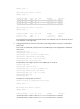
# Configure Switch B.
<SwitchB> system-view