
R211x-HP Flexfabric 11900 Layer 3 - IP Routing Configuration Guide

328
Configuration prerequisites
Before you tune and optimize OSPFv3 networks, complete the following tasks:
• Configure IPv6 addresses for interfaces to ensure IPv6 connectivity between neighboring nodes.
• Enable OSPFv3.
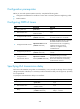
Configuring OSPFv3 timers
Ste
p
Command
Remarks
1. Enter system view.
system-view N/A
2. Enter interface view.
interface interface-type
interface-number
N/A
3. Configure the hello interval.
ospfv3 timer hello seconds
[ instance instance-id ]
By default, the hello interval on P2P and
broadcast interfaces is 10 seconds.
4. Configure the dead interval.
ospfv3 timer dead seconds
[ instance instance-id ]
By default, the dead interval on P2P and
broadcast interfaces is 40 seconds.
The dead interval set on neighboring
interfaces cannot be too short.
Otherwise, a neighbor is easily
considered down.
5. Configure the poll interval.
ospfv3 timer poll seconds
[ instance instance-id ]
By default, the poll interval is 120
seconds.
6. Configure the LSA
retransmission interval.
ospfv3 timer retransmit
interval [ instance instance-id ]
The default setting is 5 seconds.
The LSA retransmission interval cannot
be too short. Otherwise, unnecessary
retransmissions will occur.
Specifying LSA transmission delay
Each LSA in the LSDB has an age that is incremented by 1 every second, but the age does not change
during transmission. Therefore, it is necessary to add a transmission delay into the age time, especially
for low-speed links.
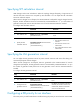
To specify the LSA transmission delay on an interface:
Ste
p
Command
Remarks
1. Enter system view.
system-view N/A
2. Enter interface view.
interface interface-type
interface-number
N/A
3. Specify the LSA transmission
delay.
ospfv3 trans-delay seconds
[ instance instance-id ]
By default, the LSA transmission
delay is 1 second.