
R211x-HP Flexfabric 11900 Layer 3 - IP Routing Configuration Guide

334
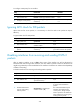
Pur
p
ose Command
Display OSPFv3 statistics. display ospfv3 [ process-id ] statistics [ error ]
Display OSPFv3 virtual link
information.
display ospfv3 [ process-id ] vlink
OSPFv3 configuration examples
OSPFv3 area configuration example
Network requirements
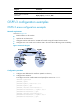
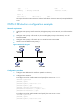
As shown in Figure 79:
• Enable OSPFv3 on all switches.
• Split the AS into three areas.
• Configure Switch B and Switch C as ABRs to forward routing information between areas.
• Configure Area 2 as a stub area to reduce LSAs in the area without affecting route reachability.
Figure 79 Network diagram
Configuration procedure
1. Configure IPv6 addresses for interfaces. (Details not shown.)
2. Configure basic OSPFv3:
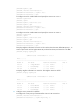
# Configure Switch A: enable OSPFv3 and specify the router ID as 1.1.1.1.
<SwitchA> system-view
[SwitchA] ospfv3
[SwitchA-ospfv3-1] router-id 1.1.1.1
[SwitchA-ospfv3-1] quit
[SwitchA] interface vlan-interface 300
[SwitchA-Vlan-interface300] ospfv3 1 area 1
[SwitchA-Vlan-interface300] quit
[SwitchA] interface vlan-interface 200
[SwitchA-Vlan-interface200] ospfv3 1 area 1
[SwitchA-Vlan-interface200] quit