
R211x-HP Flexfabric 11900 Layer 3 - IP Routing Configuration Guide


361
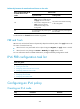
Ste
p
Command
Remarks
2. Create an IPv6 policy
or policy node, and
enter IPv6 policy
node view.
ipv6 policy-based-route policy-name [ deny |
permit ] node node-number
By default, no IPv6 policy
node is created.
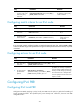
Configuring match criteria for an IPv6 node
Ste
p
Command
Remarks
1. Enter system view.
system-view N/A
2. Enter IPv6 policy
node view.
ipv6 policy-based-route policy-name [ deny | permit ]
node node-number
N/A
3. Configure an ACL
match criterion.
if-match acl { acl6-number | name acl6-name }
By default, no ACL
match criterion is
configured.
NOTE:
If an ACL match criterion is defined, packets are matched against the ACL rules, and the permit or den
y
action and the time ran
g
e of the specified ACL are i
g
nored. If the specified ACL does not exist, no packe
t
is matched.
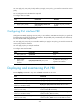
Configuring actions for an IPv6 node
Ste
p
Command
Remarks
1. Enter system view.
system-view N/A
2. Enter IPv6 policy
node view.
ipv6 policy-based-route policy-name [ deny
| permit ] node node-number
N/A
3. Set next hops for
permitted IPv6
packets.
apply next-hop [ vpn-instance
vpn-instance-name ] { ipv6-address [ direct ]
[ track track-entry-number ] }&<1-n>
By default, no next hop is specified.
You can specify multiple next hops for
backup or load sharing by executing
this command once or multiple times.
You can specify a maxium of two next
hops for a node.
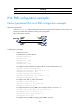
Configuring IPv6 PBR
Configuring IPv6 local PBR
Configure IPv6 PBR by applying a policy locally. IPv6 PBR uses the policy to guide the forwarding of
locally generated packets. The specified policy must already exist. Otherwise, the IPv6 local PBR
configuration fails.