
R211x-HP Flexfabric 11900 Layer 3 - IP Services Command Reference






147
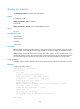
display tcp statistics
Use display tcp statistics to display TCP traffic statistics.
Syntax
In standalone mode:
display tcp statistics [ slot slot-number ]
In IRF mode:
display tcp statistics [ chassis chassis-number slot slot-number ]
Views
Any view
Predefined user roles
network-admin
network-operator
mdc-admin
mdc-operator
Parameters
slot slot-number: Displays TCP traffic statistics for the specified card. The slot-number argument specifies
the slot number of the card. The number range depends on the device model. (In standalone mode.)
chassis chassis-number slot slot-number: Displays TCP traffic statistics for the specified card on the
specified IRF member device. The chassis-number argument specifies the ID of the IRF member device.
The slot-number argument specifies the slot number of the card. (Distributed devices–In IRF mode.)
Usage guidelines
TCP traffic statistics include information about received and sent TCP packets and Syncache/syncookie.
Examples
# Display TCP traffic statistics.
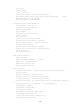
<Sysname> display tcp statistics
Received packets:
Total: 4150
packets in sequence: 1366 (134675 bytes)
window probe packets: 0, window update packets: 0
checksum error: 0, offset error: 0, short error: 0
packets dropped for lack of memory: 0
packets dropped due to PAWS: 0
duplicate packets: 12 (36 bytes), partially duplicate packets: 0 (0 bytes)
out-of-order packets: 0 (0 bytes)
packets with data after window: 0 (0 bytes)
packets after close: 0
ACK packets: 3531 (795048 bytes)
duplicate ACK packets: 33, ACK packets for unsent data: 0
Sent packets: