
R211x-HP Flexfabric 11900 Layer 3 - IP Services Command Reference




240
Related commands
reset ipv6 dhcp server ip-in-use
display ipv6 dhcp server pd-in-use
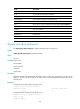
Use display ipv6 dhcp server pd-in-use to display binding information for the assigned IPv6 prefixes.
Syntax
display ipv6 dhcp server pd-in-use [ pool pool-name | prefix prefix/prefix-len ]
Views
Any view
Predefined user roles
network-admin
network-operator
mdc-admin
mdc-operator
Parameters
pool pool-name: Displays IPv6 prefix binding information for the DHCPv6 address pool specified by its
name, a case-insensitive string of 1 to 63 characters.
prefix prefix/prefix-len: Displays binding information for the specified IPv6 prefix. The value range for the
prefix length is 1 to 128.
Usage guidelines
If you do not specify any parameter, the command displays all IPv6 prefix binding information.
Examples
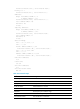
# Display all IPv6 prefix binding information.
<Sysname> display ipv6 dhcp server pd-in-use
Pool: 1
IPv6 prefix Type Lease expiration
2:1::/24 Auto(O) Jul 10 19:45:01 2008
Pool: 2
IPv6 prefix Type Lease expiration
1:1::/64 Static(F) Not available
Pool: 3
IPv6 prefix Type Lease expiration
1:2::/64 Static(O) Oct 9 09:23:31 2008
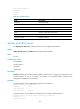
# Display IPv6 prefix binding information for DHCPv6 address pool 1.
<Sysname> display ipv6 dhcp server pd-in-use pool 1
Pool: 1
IPv6 prefix Type Lease expiration
2:1::/24 Auto(O) Jul 10 22:22:22 2008
3:1::/64 Static(C) Jan 1 11:11:11 2008
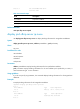
# Display binding information for the IPv6 prefix 2:1::3/24.