
R211x-HP Flexfabric 11900 Layer 3 - IP Services Command Reference



283
Related commands
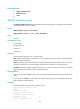
• display interface tunnel
• interface tunnel
• source
display interface tunnel
Use display interface tunnel to display information about tunnel interfaces, including the source address,
destination address, and tunnel mode.
Syntax
display interface [ tunnel ] [ brief [ down ] ]
display interface [ tunnel [ number ] ] [ brief [ description ] ]
Views
Any view
Predefined user roles
network-admin
network-operator
mdc-admin
mdc-operator
Parameters
number: Specifies the number of a tunnel interface.
brief: Displays brief interface information. If you do not specify this keyword, this command displays
detailed interface information.
down: Displays information about interfaces in the physical state of DOWN and the causes. If you do not
specify this keyword, this command displays information about interfaces in all physical states.
description: Displays complete interface descriptions. If you do not specify this keyword, the command
displays only the first 27 characters of interface descriptions.
Usage guidelines
If you do not specify the tunnel keyword, this command displays information about all interfaces on the
device.
If you specify the tunnel keyword without the number argument, this command displays information
about all existing tunnel interfaces.
Examples
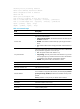
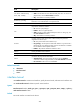
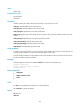
# Display detailed information about interface Tunnel 1.
<Sysname> display interface tunnel 1
Tunnel1
Current state: DOWN
Line protocol state: DOWN
Description: Tunnel1 Interface
Bandwidth: 100kbps
Maximum Transmit Unit: 64000