
R211x-HP Flexfabric 11900 Layer 3 - IP Services Command Reference



26
Usage guidelines
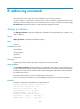
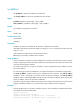
Use the display ip interface brief command to display brief IP configuration information, including the
state, IP address, and description of the physical and link layer protocols, for the specified Layer 3
interface or all Layer 3 interfaces.
If you do not specify the interface type and interface number, this command displays the brief IP
configuration information for all Layer 3 interfaces.
If you specify only the interface type, this command displays the brief IP configuration information for all
Layer 3 interfaces of the specified type.
If you specify both the interface type and interface number, this command displays the brief IP
configuration information for the specified interface.
Examples
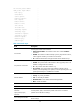
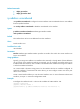
# Display brief IP configuration information for VLAN interfaces.
<Sysname> display ip interface vlan-interface brief
*down: administratively down
(s): spoofing
Interface Physical Protocol IP Address Description
Vlan10 down down 6.6.6.1 Vlan-inte...
Vlan2 down down 7.7.7.1 Vlan-inte...
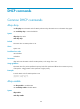
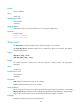
Table 4 Command output
Field Descri
p
tion
*down: administratively
down
The interface is administratively shut down with the shutdown command.
(s) : spoofing
Spoofing attribute of the interface. It indicates that an interface might have no link
present even when its link layer protocol is displayed up or the link is set up only on
demand.
Interface Interface name.
Physical
Physical state of the interface:
• *down—The interface is administratively shut down with the shutdown
command.
• down—The interface is administratively up but its physical state is down (possibly
because of poor connection or line failure).
• up—Both the administrative and physical states of the interface are up.
Protocol
Link layer protocol state of the interface:
• down—The protocol state of the interface is down (typically when no IP address
is configured for the interface).
• up—The protocol state of the interface is up.
• up(s)—The protocol state of the interface is up (spoofing).
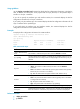
IP Address IP address of the interface. If no IP address is configured, unassigned is displayed.
Description
Interface description information, a maximum of 12 characters can be displayed. If
there are more than 12 characters, only the first nine characters are displayed.
Related commands
• display ip interface
• ip address