
R211x-HP Flexfabric 11900 Layer 3 - IP Services Command Reference




73
Syntax
dhcp relay information remote-id { normal [ format { ascii | hex } ] | string remote-id | sysname }
undo dhcp relay information remote-id
Default
The content mode is normal and the padding format is hex.
Views
Interface view
Predefined user roles
network-admin
mdc-admin
Parameters
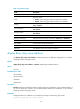
normal: Specifies the normal mode in which the padding content is the MAC address of the receiving
interface.
format: Specifies the code type for the remote ID sub-option. The default code type is hex.
ascii: Specifies the ASCII code type.
hex: Specifies the Hex code type.
string remote-id: Specifies a case-sensitive string of 1 to 63 characters as the content of the remote ID
sub-option.
sysname: Uses the device name as the content of the remote ID sub-option. You can set the device name
by using the sysname command.
Usage guidelines
The padding format for the specified character string (string) or the device name (sysname) is always
ASCII. The padding format for the normal mode is determined by the command.
If you use the command multiple times, the most recent configuration takes effect.
Examples
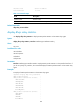
# Specify the padding content for the remote ID sub-option of Option 82 as device001.
<Sysname> system-view
[Sysname] interface vlan-interface 10
[Sysname-Vlan-interface10] dhcp relay information enable
[Sysname-Vlan-interface10] dhcp relay information strategy replace
[Sysname-Vlan-interface10] dhcp relay information remote-id string device001
Related commands
• dhcp relay information enable
• dhcp relay information strategy
• display dhcp relay information
dhcp relay information strategy
Use dhcp relay information strategy to configure the strategy for the DHCP relay agent to handle
messages containing Option 82.