
R211x-HP Flexfabric 11900 Layer 3 - IP Services Configuration Guide


7
Displaying and maintaining ARP
IMPORTANT:
Clearing ARP entries from the ARP table might cause communication failures. Make sure the entries to be
cleared do not affect current communications.
Execute display commands in any view and reset commands in user view.
Task Command
Display ARP entries (in standalone mode).
display arp [ [ all | dynamic | multiport | static ] [ slot
slot-number ] | vlan vlan-id | interface interface-type
interface-number ] [ count | verbose ]
Display ARP entries (in IRF mode).
display arp [ [ all | dynamic | multiport | static ] [ chassis
chassis-number slot slot-number ] | vlan vlan-id | interface
interface-type interface-number ] [ count | verbose ]
Display the ARP entry for a specified IP
address (in standalone mode).
display arp ip-address [ slot slot-number ] [ verbose ]
Display the ARP entry for a specified IP
address (in IRF mode).
display arp ip-address [ chassis chassis-number slot slot-number ]
[ verbose ]
Display the ARP entries for a specified VPN
instance.
display arp vpn-instance vpn-instance-name [ count ]
Display the aging timer of dynamic ARP
entries.
display arp timer aging
Clear ARP entries from the ARP table (in
standalone mode).
reset arp { all | dynamic | interface interface-type
interface-number | multiport | slot slot-number | static }
Clear ARP entries from the ARP table (in IRF
mode).
reset arp { all | chassis chassis-number slot slot-number |
dynamic | interface interface-type interface-number | multiport |
static }
Configuration examples
Static ARP configuration example
Network requirements
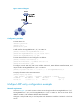
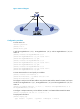
As shown in Figure 3, hosts are connected to the switch, which is connected to the router through
interface Ten-GigabitEthernet 1/0/1 in VLAN 10.
To ensure secure communications between the router and switch, configure a static ARP entry for the
router on the switch.