
R211x-HP Flexfabric 11900 Layer 3 - IP Services Configuration Guide

171
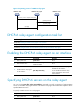
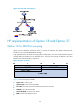
Figure 67 Operating process of a DHCPv6 relay agent
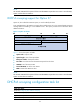
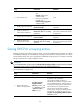
DHCPv6 relay agent configuration task list
Tasks at a
g
lance
(Required.) Enabling the DHCPv6 relay agent on an interface
(Required.) Specifying DHCPv6 servers on the relay agent
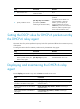
(Optional.) Setting the DSCP value for DHCPv6 packets sent by the DHCPv6 relay agent
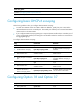
Enabling the DHCPv6 relay agent on an interface
Ste
p
Command
Remarks
1. Enter system view.
system-view N/A
2. Enter interface view.
interface interface-type
interface-number
N/A
3. Enable DHCPv6 relay agent
on the interface.
ipv6 dhcp select relay
By default, the DHCPv6 relay agent is
disabled on the interface.
Do not enable the DHCPv6 relay
agent and DHCPv6 client on the
same interface.
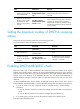
Specifying DHCPv6 servers on the relay agent
You can use the ipv6 dhcp relay server-address command to specify a maximum of eight DHCPv6
servers on the DHCP relay agent interface. The DHCPv6 relay agent forwards DHCP requests to all the
specified DHCPv6 servers.
To specify a DHCPv6 server on a relay agent:
Ste
p
Command
Remarks
1. Enter system view.
system-view N/A
(1) Solicit (contains a Rapid Commit option)
(4) Reply
DHCPv6 client DHCPv6 relay agent DHCPv6 server
(2) Relay-forward
(3) Relay-reply