
R211x-HP Flexfabric 11900 Layer 3 - IP Services Configuration Guide

173
DHCPv6 relay agent configuration example
Network requirements
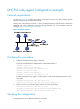
As shown in Figure 68, configure the DHCPv6 relay agent on Switch A to relay DHCPv6 packets
between DHCPv6 clients and the DHCPv6 server.
Switch A acts as the gateway of network 1::/64. It sends RA messages to notify the hosts to obtain IPv6
addresses and other configuration parameters through DHCPv6. For more information about RA
messages, see "Configuring basic IPv6 settings."
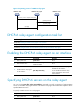
Figure 68 Network diagram
Configuration procedure
1. Configure the DHCPv6 relay agent on Switch A:
# Specify IPv6 addresses for VLAN-interface 2 and VLAN-interface 3.
<SwitchA> system-view
[SwitchA] interface vlan-interface 2
[SwitchA-Vlan-interface2] ipv6 address 2::1 64
[SwitchA-Vlan-interface2] quit
[SwitchA] interface vlan-interface 3
[SwitchA-Vlan-interface3] ipv6 address 1::1 64
# Enable the DHCPv6 relay agent on VLAN-interface 3 and specify the DHCPv6 server on the
relay agent.
[SwitchA-Vlan-interface3] ipv6 dhcp select relay
[SwitchA-Vlan-interface3] ipv6 dhcp relay server-address 2::2
2. Enable Switch A to send RA messages, and turn on the M and O flags.
[SwitchA-Vlan-interface3] undo ipv6 nd ra halt
[SwitchA-Vlan-interface3] ipv6 nd autoconfig managed-address-flag
[SwitchA-Vlan-interface3] ipv6 nd autoconfig other-flag
Verifying the configuration
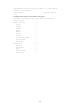
# Display DHCPv6 server address information on Switch A.