
R211x-HP Flexfabric 11900 Layer 3 - IP Services Configuration Guide


72
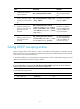
Ste
p
Command
Remarks
2. Specify a file to save DHCP
snooping entries.
dhcp snooping binding database
filename { filename | url url
[ username username
[ password { cipher | simple }
key ] ] }
By default, no file is specified.
This command enables the device to
immediately save DHCP snooping
entries to the specified database file.
If the file does not exist, the device
automatically creates the file. The
device does not update the file for a
specified amount of time after a
DHCP snooping entry changes. The
default period is 300 seconds. To
change the value, use the dhcp
snooping binding database update
interval command.
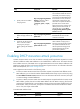
3. (Optional.) Manually save
DHCP snooping entries to the
file.
dhcp snooping binding database
update now
DHCP snooping entries are saved to
the database file each time this
command is executed.
4. (Optional.) Set the amount of
time to wait after a DHCP
snooping entry changes
before updating the database
file.
dhcp snooping binding database
update interval seconds
The default setting is 300 seconds.
When a DHCP snooping entry is
learned or removed, the device does
not update the database file until
after the specified waiting period.
All changed entries during that
period will be updated.
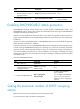
Enabling DHCP starvation attack protection
A DHCP starvation attack occurs when an attacker constantly sends forged DHCP requests that contain
identical or different sender MAC addresses in the chaddr field to a DHCP server. This attack exhausts
the IP address resources of the DHCP server so legitimate DHCP clients cannot obtain IP addresses. The
DHCP server might also fail to work because of exhaustion of system resources. For information about the
fields of DHCP packet, see "DHCP message format."
Pr
otect against starvation attacks in the following ways:
• To relieve a DHCP starvation attack that uses DHCP requests encapsulated with different sender
MAC addresses, you can limit the number of MAC addresses that a Layer 2 port can learn by using
the mac-address max-mac-count command. For more information about the command, see Layer
2—LAN Switching Command Reference.
• To prevent a DHCP starvation attack that uses DHCP requests encapsulated with the same sender
MAC address, perform this task to enable MAC address check for DHCP snooping. This function
compares the chaddr field of a received DHCP request with the source MAC address field in the
frame header. If they are the same, the request is considered valid and forwarded to the DHCP
server. If not, the request is discarded.
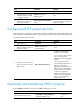
To enable MAC address check:
Step Command Remarks
1. Enter system view.
system-view N/A