
R211x-HP Flexfabric 11900 Layer 3 - IP Services Configuration Guide


75
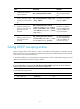
Task Command Remarks
Display Option 82 configuration
information on the DHCP snooping
device.
display dhcp snooping information { all |
interface interface-type interface-number }
Available in any
view.
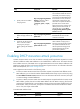
Display DHCP packet statistics on the
DHCP snooping device (in standalone
mode).
display dhcp snooping packet statistics [ slot
slot-number ]
Available in any
view.
Display DHCP packet statistics on the
DHCP snooping device (in IRF mode).
display dhcp snooping packet statistics
[ chassis chassis-number slot slot-number ]
Available in any
view.
Display information about trusted
ports.
display dhcp snooping trust
Available in any
view.
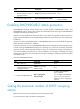
Display information about the file that
stores DHCP snooping entries.
display dhcp snooping binding database
Available in any
view.
Clear DHCP snooping entries.
reset dhcp snooping binding { all | ip
ip-address [ vlan vlan-id ] }
Available in user
view.
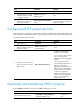
Clear DHCP packet statistics on the
DHCP snooping device (distributed
devices–centralized IRF devices–in
standalone mode).
reset dhcp snooping packet statistics [ slot
slot-number ]
Available in user
view.
Clear DHCP packet statistics on the
DHCP snooping device (distributed
devices–in IRF mode).
reset dhcp snooping packet statistics [ chassis
chassis-number slot slot-number ]
Available in user
view.
DHCP snooping configuration examples
Basic DHCP snooping configuration example
Network requirements
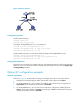
As shown in Figure 27, configure the port Ten-GigabitEthernet 1/0/1 connected to the DHCP server as
a trusted port and configure other ports as untrusted ports. Enable DHCP snooping to record clients'
IP-MAC bindings by reading DHCP-ACK messages received from the trusted port and DHCP-REQUEST
messages.