
R211x-HP Flexfabric 11900 MPLS Command Reference
112
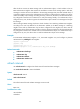
auth-key: Specifies the authentication key. This argument is case sensitive. If the cipher keyword is
specified, it must be a ciphertext string of 1 to 53 characters. If the plain keyword is specified, it must be
a plaintext string of 1 to 16 characters.
Usage guidelines
RSVP authentication ensures integrity of RSVP messages, preventing fake resource reservation requests
from occupying network resources.
RSVP uses MD5 to calculate a digest for the authentication key and the message body, adds the digest
to the message, and sends the message. When the peer receives the message, it performs the same
calculation and compares the calculated digest with the digest in the message. If the two digests are the
same, the message passes the RSVP authentication and is accepted. Otherwise, the peer device discards
the message.
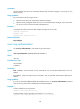
RSVP authentication can be configured in the following views:
• RSVP view—Configuration in this view applies to all RSVP security associations.
• RSVP neighbor view—Configuration in this view applies only to RSVP security associations with the
specified RSVP neighbor.
• Interface view—Configuration in this view applies only to RSVP security associations established on
the current interface.
Configurations in RSVP neighbor view, interface view, and RSVP view are in descending order of priority.
For example, if you have enabled RSVP authentication for a neighbor in both RSVP neighbor view and
RSVP view but configured different authentication keys, the authentication key configured in RSVP
neighbor view is used to authenticate the RSVP messages received from the neighbor.
To reestablish a security association, you must delete the authentication key used by the current security
association or delete the current security association (using the reset rsvp authentication command).
Then the device can reestablish a security association by looking up a new authentication key in order
of priorities.
When using this command, follow these guidelines:
• After you enable RSVP authentication on the local device, you must also enable RSVP authentication
and configure the same authentication key on the RSVP neighbor.
• For security purposes, all keys, including keys configured in plain text, are saved in cipher text.
Examples
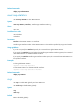
# Enable RSVP authentication and configure the authentication key as abcdefgh on interface
VLAN-interface 10.
<Sysname> system-view
[Sysname] interface vlan-interface 10
[Sysname-Vlan-interface10] rsvp authentication key plain abcdefgh
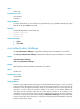
Related commands
• authentication challenge
• authentication key
• authentication lifetime
• authentication window-size
• display rsvp authentication
• reset rsvp authentication
• rsvp authentication challenge