
R211x-HP Flexfabric 11900 MPLS Command Reference
65
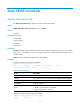
mpls te loop-detection
Use mpls te loop-detection to enable loop detection during establishment of an MPLS TE tunnel.
Use undo mpls te loop-detection to disable loop detection for the MPLS TE tunnel.
Syntax
mpls te loop-detection
undo mpls te loop-detection
Default
Loop detection is disabled for an MPLS TE tunnel.
Views
Tunnel interface view
Predefined user roles
network-admin
mdc-admin
Usage guidelines
When loop detection is enabled on the ingress node of an MPLS TE tunnel, the route recording function
is automatically enabled for the tunnel, regardless of whether you have configured the mpls te
record-route command. When establishing the MPLS TE tunnel, each node of the tunnel detects whether
a loop has occurred according to the recorded route information.
Examples
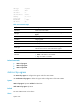
# Enable loop detection for establishing MPLS TE tunnel 0.
<Sysname> system-view
[Sysname] interface tunnel 0 mode mpls-te
[Sysname-Tunnel0] mpls te loop-detection
mpls te record-route
Use mpls te record-route to enable route recording and label recording for the tunnel.
Use undo mpls te record-route to restore the default.
Syntax
mpls te record-route [ label ]
undo mpls te record-route
Default
A tunnel does not support route recording or label recording.
Views
Tunnel interface view
Predefined user roles
network-admin
mdc-admin