
R211x-HP Flexfabric 11900 MPLS Configuration Guide

123
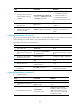
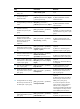
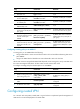
Ste
p
Command
Remarks
4. Configure the type codes of
OSPF extended community
attributes.
ext-community-type { domain-id
type-code1 | router-id type-code2
| route-type type-code3 }
The defaults are as follows:
• 0x0005 for Domain ID.
• 0x0107 for Router ID.
• 0x0306 for Route Type.
Perform this configuration on the
PE.
5. Create an OSPF area and
enter area view.
area area-id
By default, no OSPF area is
created.
6. Enable OSPF on the interface
attached to the specified
network in the area.
network ip-address wildcard-mask
By default, an interface neither
belongs to any area nor runs
OSPF.
Configuring IS-IS between a PE and a CE
An IS-IS process belongs to the public network or a single VPN instance. If you create an IS-IS process
without binding it to a VPN instance, the process belongs to the public network.
To configure IS-IS between a PE and a CE:
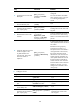
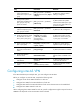
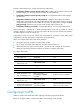
Ste
p
Command
Remarks
1. Enter system view.
system-view N/A
2. Create an IS-IS process for a
VPN instance and enter IS-IS
view.
isis [ process-id ] vpn-instance
vpn-instance-name
Perform this configuration on the
PE. On the CE, configure common
IS-IS.
3. Configure a network entity
title for the IS-IS process.
network-entity net By default, no NET is configured.
4. Return to system view.
quit N/A
5. Enter interface view.
interface interface-type
interface-number
N/A
6. Enable the IS-IS process on
the interface.
isis enable [ process-id ]
By default, no IS-IS process is
enabled on the interface.
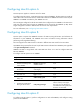
Configuring EBGP between a PE and a CE
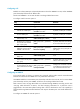
1. Configure the PE:
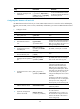
Ste
p
Command
Remarks
1. Enter system view.
system-view N/A
2. Enable BGP and enter BGP
view.
bgp as-number N/A
3. Enter BGP-VPN instance view.
ip vpn-instance
vpn-instance-name
Configuration commands in
BGP-VPN instance view are the
same as those in BGP view. For
details, see Layer 3—IP Routing
Configuration Guide.