
R211x-HP Flexfabric 11900 MPLS Configuration Guide

126
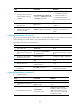
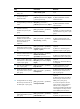
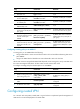
2. Configure the CE:
Ste
p
Command
Remarks
1. Enter system view.
system-view N/A
2. Enter BGP view.
bgp as-number N/A
3. Configure the PE as an IBGP
peer.
peer { group-name | ip-address }
as-number as-number
By default, no BGP peer is
created.
4. Create and enter BGP IPv4
unicast family view.
address-family ipv4 [ unicast ] N/A
5. Enable IPv4 unicast route
exchange with the specified
peer or peer group.
peer { group-name | ip-address }
enable
By default, BGP does not
exchange IPv4 unicast routes
with any peer.
6. (Optional.) Configure route
redistribution.
import-route protocol
[ { process-id | all-processes }
[ med med-value | route-policy
route-policy-name ] * ]
A CE must redistribute its routes
to the PE so the PE can advertise
them to the peer CE.
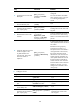
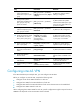
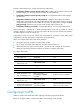
Configuring routing between PEs
Ste
p
Command
Remarks
1. Enter system view.
system-view N/A
2. Enter BGP view.
bgp as-number N/A
3. Configure the remote PE as a
BGP peer.
peer { group-name | ip-address }
as-number as-number
By default, no BGP peer is created.
4. Specify the source interface
for route updates.
peer { group-name | ip-address }
connect-interface interface-type
interface-number
By default, BGP uses the egress
interface of the optimal route
destined for the peer as the source
interface.
5. Enter BGP-VPNv4 address
family view.
address-family vpnv4 N/A
6. Enable BGP-VPNv4 route
exchange with the specified
peer.
peer { group-name | ip-address }
enable
By default, BGP does not exchange
BGP-VPNv4 routes with any peer.
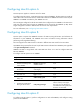
Configuring BGP VPNv4 route control
BGP VPNv4 route control is configured similarly with BGP route control, except that it is configured in
BGP-VPNv4 address family view. For detailed information about BGP route control, see Layer 3—IP
Routing Configuration Guide.
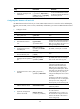
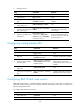
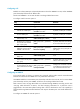
To configure BGP VPNv4 route control:
Ste
p
Command
Remarks
1. Enter system view.
system-view N/A
2. Enter BGP view.
bgp as-number N/A