
R211x-HP Flexfabric 11900 MPLS Configuration Guide

134
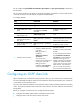
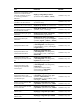
Configuring a loopback interface
Ste
p
Command
Remarks
1. Enter system view.
system-view N/A
2. Create a loopback interface
and enter loopback interface
view.
interface loopback
interface-number
N/A
3. Bind the loopback interface to
a VPN instance.
ip binding vpn-instance
vpn-instance-name
By default, the interface is
associated with no VPN instance.
4. Configure the address of the
loopback interface.
ip address ip-address { mask |
mask-length }
N/A
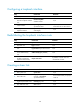
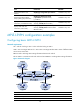
Redistributing the loopback interface route
Ste
p
Command
Remarks
1. Enter system view.
system-view N/A
2. Enter BGP view.
bgp as-number N/A
3. Enter BGP-VPN instance
view.
ip vpn-instance vpn-instance-name N/A
4. Enter BGP-VPN IPv4
unicast address family
view.
address-family ipv4 [ unicast ] N/A
5. Redistribute direct routes
into BGP (including the
loopback interface route).
import-route direct
By default, no direct routes are
redistributed into BGP.
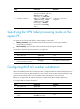
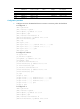
Creating a sham link
Ste
p
Command
Remarks
1. Enter system view.
system-view N/A
2. Enter OSPF view.
ospf [ process-id | router-id
router-id | vpn-instance
vpn-instance-name ] *
HP recommends that you specify a
router ID.
3. Configure the external route
tag for imported VPN routes.
route-tag tag-value N/A
4. Enter OSPF area view.
area area-id N/A