
R211x-HP Flexfabric 11900 MPLS Configuration Guide

9
Ste
p
Command
Remarks
1. Enter system view.
system-view N/A
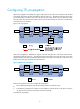
2. Enable TTL propagation.
mpls ttl propagate { public |
vpn }
By default, TTL propagation is enabled only
for public-network packets.
This command affects only the propagation
between IP TTL and label TTL. Within an
MPLS network, TTL is always copied between
the labels of an MPLS packet.
After TTL propagation is enabled or disabled, execute the reset mpls ldp command to make the
configuration take effect. For more information about the reset mpls ldp command, see MPLS Command
Reference.
Enabling sending of MPLS TTL-expired messages
This feature enables an LSR to generate an ICMP TTL-expired message upon receiving an MPLS packet
with a TTL of 1. If the MPLS packet has only one label, the LSR sends the ICMP TTL-expired message back
to the source through IP routing. If the MPLS packet has multiple labels, the LSR sends it along the LSP to
the egress, which then sends the message back to the source.
To enable sending of MPLS TTL-expired messages:
Ste
p
Command
Remarks
1. Enter system view.
system-view N/A
2. Enable sending of MPLS
TTL-expired messages.
mpls ttl expiration enable By default, this function is enabled.
Enabling SNMP notifications for MPLS
This feature enables MPLS to generate SNMP notifications. The generated SNMP notifications are sent to
the SNMP module.
For more information about SNMP notifications, see Network Management and Monitoring
Configuration Guide.
To enable SNMP notifications for MPLS:
Ste
p
Command
Remarks
1. Enter system view.
system-view N/A
2. Enable SNMP notifications
for MPLS.
snmp-agent trap enable mpls
By default, SNMP notifications for
MPLS are enabled.
Displaying and maintaining MPLS
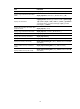
Execute display commands in any view.