
R211x-HP Flexfabric 11900 MPLS Configuration Guide


185
Configuring HoVPN
Network requirements
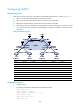
There are two levels of networks, the backbone and the MPLS VPN networks, as shown in Figure 54.
• SPEs act as PEs to allow MPLS VPNs to access the backbone.
• UPEs act as PEs of the MPLS VPNs to allow end users to access the VPNs.
• Performance requirements for the UPEs are lower than those for the SPEs.
• SPEs advertise routes permitted by the routing policies to UPEs, permitting CE 1 and CE 3 in VPN
1 to communicate with each other, and forbidding CE 2 and CE 4 in VPN 2 to communicate with
each other.
Figure 54 Network diagram
Device Interface IP address Device Interface IP address
CE 1 Vlan-int12 10.2.1.1/24
CE 3
Vlan-int12 10.1.1.1/24
CE 2 Vlan-int13 10.4.1.1/24
CE 4
Vlan-int13 10.3.1.1/24
UPE 1 Loop0 1.1.1.9/32 UPE 2 Loop0 4.4.4.9/32
Vlan-int11 172.1.1.1/24
Vlan-int11 172.2.1.1/24
Vlan-int12 10.2.1.2/24
Vlan-int12 10.1.1.2/24
Vlan-int13 10.4.1.2/24 Vlan-int13 10.3.1.2/24
SPE 1 Loop0 2.2.2.9/32
SPE 2
Loop0
3.3.3.9/32
Vlan-int11 172.1.1.2/24
Vlan-int11 172.2.1.2/24
Vlan-int12 180.1.1.1/24 Vlan-int12 180.1.1.2/24
Configuration procedure
1. Configure UPE 1:
# Configure basic MPLS and MPLS LDP to establish LDP LSPs.
<UPE1> system-view
[UPE1] interface loopback 0
[UPE1-LoopBack0] ip address 1.1.1.9 32
[UPE1-LoopBack0] quit
[UPE1] mpls lsr-id 1.1.1.9
[UPE1] mpls ldp