
R211x-HP Flexfabric 11900 MPLS Configuration Guide

195
[PE2-ospf-100] quit
[PE2] bgp 100
[PE2-bgp] ip vpn-instance vpn1
[PE2-bgp-vpn1] address-family ipv4 unicast
[PE2-bgp-ipv4-vpn1] import-route ospf 100
[PE2-bgp-ipv4-vpn1] import-route direct
[PE2-bgp-ipv4-vpn1] quit
[PE2-bgp-vpn1] quit
[PE2-bgp] quit
# Execute the display ip routing-table vpn-instance command on the PEs to verify that the path to
the peer CE is along the OSPF route across the customer networks, instead of the BGP route across
the backbone.
4. Configure a sham link:
# Configure PE 1.
[PE1] interface loopback 1
[PE1-LoopBack1] ip binding vpn-instance vpn1
[PE1-LoopBack1] ip address 3.3.3.3 32
[PE1-LoopBack1] quit
[PE1] ospf 100
[PE1-ospf-100] area 1
[PE1-ospf-100-area-0.0.0.1] sham-link 3.3.3.3 5.5.5.5 cost 10
[PE1-ospf-100-area-0.0.0.1] quit
[PE1-ospf-100] quit
# Configure PE 2.
[PE2] interface loopback 1
[PE2-LoopBack1] ip binding vpn-instance vpn1
[PE2-LoopBack1] ip address 5.5.5.5 32
[PE2-LoopBack1] quit
[PE2] ospf 100
[PE2-ospf-100] area 1
[PE2-ospf-100-area-0.0.0.1] sham-link 5.5.5.5 3.3.3.3 cost 10
[PE2-ospf-100-area-0.0.0.1] quit
[PE2-ospf-100] quit
Verifying the configuration
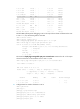
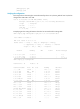
# Execute the display ip routing-table vpn-instance command again on the PEs. The output shows that
the path to the peer CE is now along the BGP route across the backbone, and a route to the sham link
destination address is present.
# Execute the display ip routing-table command on the CEs. The output shows that the next hop of the
OSPF route to the peer CE is the VLAN interface 11 connected to the PE. This means that VPN traffic to
the peer is forwarded over the backbone.
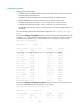
# Execute the display ospf sham-link command on the PEs. The output shows that a sham link has been
established. Take PE 1 as an example:
[PE1] display ospf sham-link
OSPF Process 100 with Router ID 100.1.1.2
Sham link