
R211x-HP Flexfabric 11900 MPLS Configuration Guide


203
To deploy special IPv6 MPLS L3VPN networks, such as inter-AS VPN, you must also perform specific
configurations in addition to the basic IPv6 MPLS L3VPN configuration. For details, see the related
sections.
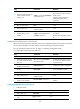
Tasks at a
g
lance
Configuring basic IPv6 MPLS L3VPN
Configuring inter-AS IPv6 VPN
Configuring basic IPv6 MPLS L3VPN
The key task in IPv6 MPLS L3VPN configuration is to manage the advertisement of IPv6 VPN routes on the
MPLS backbone, including management of PE-CE route exchange and PE-PE route exchange.
To configure basic IPv6 MPLS L3VPN:
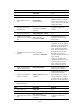
Tasks at a
g
lance
Configuring VPN instances:
1. (Required.) Creating a VPN instance
2. (R
equired.) Associating a VPN instance with an interface
3. (Opti
onal.) Configuring route related attributes for a VPN instance
(Required.) Configuring routing between a PE and a CE
(Required.) Configuring routing between PEs
(Optional.) Configuring BGP VPNv6 route control
Before configuring basic IPv6 MPLS L3VPN, complete the following tasks:
• Configure an IGP on the PEs and Ps to ensure IP connectivity within the MPLS backbone.
• Configure basic MPLS for the MPLS backbone.
• Configure MPLS LDP on PEs and Ps to establish LDP LSPs.
Configuring VPN instances
By configuring VPN instances on a PE, you isolate not only VPN routes from public network routes, but
also routes between VPNs. This feature allows VPN instances to be used in network scenarios besides
MPLS L3VPNs.
All VPN instance configurations are performed on PEs.
Creating a VPN instance
A VPN instance is associated with a site. It is a collection of the VPN membership and routing rules of its
associated site. A VPN instance does not necessarily correspond to one VPN.
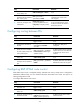
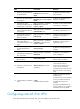
To create and configure a VPN instance: