
R211x-HP Flexfabric 11900 MPLS Configuration Guide


212
There are three inter-AS VPN solutions (for more information, see "Configuring MPLS L3VPN"). IPv6
MPLS L3VPN supports only inter-AS VPN option A and option C.
Before configuring inter-AS IPv6 VPN, complete these tasks:
• Configure an IGP for the MPLS backbone in each AS to ensure IP connectivity.
• Configure basic MPLS for the MPLS backbone of each AS.
• Configure MPLS LDP for the MPLS backbones so that LDP LSPs can be established.
The following sections describe inter-AS IPv6 VPN option A and option C. Select one according to your
network scenario.
Configuring inter-AS IPv6 VPN option A
Inter-AS IPv6 VPN option A applies to scenarios where the number of VPNs and that of VPN routes on
the PEs are relatively small.
To configure inter-AS IPv6 option A:
• Configure basic IPv6 MPLS L3VPN on each AS.
• Configure VPN instances on both PEs and ASBR-PEs. The VPN instances on PEs allow CEs to access
the network, and those on ASBR-PEs are for access of the peer ASBR-PEs.
For more configuration information, see "Configuring MPLS L3VPN."
In the in
ter-AS IPv6 VPN option A solution, for the same IPv6 VPN, the route targets configured on the PEs
must match those configured on the ASBR-PEs in the same AS to make sure VPN routes sent by the PEs (or
ASBR-PEs) can be received by the ASBR-PEs (or PEs). Route targets configured on the PEs in different ASs
do not have such requirements.
Configuring inter-AS IPv6 VPN option C
To configure inter-AS IPv6 VPN option C, perform proper configurations on PEs and ASBR-PEs, and
configure routing policies on the ASBR-PEs.
Configuring the PEs
Establish an IBGP peer relationship between a PE and an ASBR-PE in an AS, and an MP-EBGP peer
relationship between PEs in different ASs.
The PEs and ASBR-PEs in an AS must be able to exchange labeled routes.
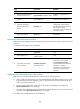
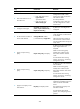
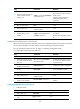
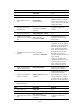
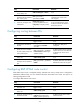
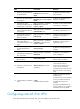
To configure a PE for inter-AS IPv6 VPN option C:
Ste
p
Command
Remarks
1. Enter system view.
system-view N/A
2. Enter BGP view.
bgp as-number N/A
3. Configure the ASBR-PE in the
same AS as an IBGP peer.
peer { group-name | ip-address }
as-number as-number
By default, no BGP peer is
configured.
4. Enter BGP IPv4 unicast
address family view.
address-family ipv4 [ unicast ] N/A
5. Enable the PE to exchange
BGP IPv4 unicast routes with
the ASBR-PE in the same AS.
peer { group-name | ip-address }
enable
By default, the PE does not
exchange BGP IPv4 unicast routes
with any peer.