
R211x-HP Flexfabric 11900 MPLS Configuration Guide




222
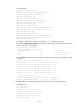
Interface : NULL0 Cost : 0
Destination: FF00::/8 Protocol : Direct
NextHop : :: Preference: 0
Interface : NULL0 Cost : 0
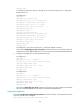
# CEs of the same VPN can ping each other, and CEs of different VPNs cannot ping each other. For
example, CE 1 can ping CE 3 (2001:3::1), but cannot ping CE 4 (2001:4::1):
Configuring IPv6 MPLS L3VPN inter-AS option A
Network requirements
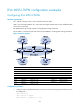
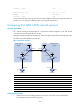
CE 1 and CE 2 belong to the same VPN. CE 1 accesses the network through PE 1 in AS 100, and CE
2 accesses the network through PE 2 in AS 200.
Configure IPv6 MPLS L3VPN inter-AS option A, and use the VRF-to-VRF method to manage VPN routes.
Run OSPF on the MPLS backbone of each AS.
Figure 60 Network diagram
Device Interface IP
address
Device
Interface IP address
CE 1 Vlan-int12 2001:1::1/96
CE 2
Vlan-int12 2001:2::1/96
PE 1 Loop0 1.1.1.9/32 PE 2 Loop0 4.4.4.9/32
Vlan-int12 2001:1::2/96
Vlan-int12 2001:2::2/96
Vlan-int11 172.1.1.2/24
Vlan-int11 162.1.1.2/24
ASBR-PE 1 Loop0 2.2.2.9/32 ASBR-PE 2 Loop0 3.3.3.9/32
Vlan-int11 172.1.1.1/24
Vlan-int11 162.1.1.1/24
Vlan-int12 2002:1::1/96
Vlan-int12 2002:1::2/96
Configuration procedure
1. Configure an IGP on each MPLS backbone to ensure IP connectivity within the backbone:
This example uses OSPF. (Details not shown.)
Loop0 Loop0
Loop0 Loop0
Vlan-int12
CE 1 CE 2
AS 65001 AS 65002
PE 1
PE 2
ASBR-PE 2
ASBR-PE 1
MPLS backbone
MPLS backbone
AS 100
AS 200
Vlan-int12
Vlan-int12
Vlan-int12
Vlan-int11
Vlan-int11
Vlan-int12Vlan-int12
Vlan-int11
Vlan-int11