
R211x-HP Flexfabric 11900 MPLS Configuration Guide

235
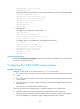
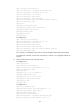
[PE1-bgp-vpnv4] quit
[PE1-bgp] quit
# Configure PE 2 in the same way that PE 1 is configured. (Details not shown.)
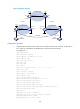
# Execute the display mpls ldp peer command on PE 1 or PE 2 to verify that the LDP session has
been established.
# Execute the display bgp peer vpnv4 command to verify that a BGP peer relationship has been
established and has reached the Established state.
# Execute the display isis peer command to verify that an IS-IS neighbor relationship has been set
up. Take PE 1 as an example:
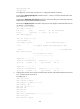
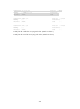
[PE1] display mpls ldp peer
Total number of peers: 1
Peer LDP ID State LAM Role GR MD5 KA Sent/Rcvd
4.4.4.9:0 Operational DU Active Off Off 8/8
[PE1] display bgp peer
BGP local router ID: 3.3.3.9
Local AS number: 100
Total number of peers: 1 Peers in established state: 1
Peer AS MsgRcvd MsgSent OutQ PrefRcv Up/Down State
4.4.4.9 100 3 6 0 0 00:00:32 Established
[PE1] display isis peer
Peer information for ISIS(1)
----------------------------
System Id: 0000.0000.0005
Interface: Vlan-interface12 Circuit Id: 0000.0000.0005.02
State: Up HoldTime: 8s Type: L1(L1L2) PRI: 64
System Id: 0000.0000.0005
Interface: Vlan-interface12 Circuit Id: 0000.0000.0005.02
State: Up HoldTime: 8s Type: L2(L1L2) PRI: 64
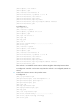
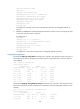
2. Configure the customer carrier network. Enable IS-IS as the IGP, and enable LDP between PE 3 and
CE 1, and between PE 4 and CE 2:
# Configure PE 3.
<PE3> system-view
[PE3] interface loopback 0
[PE3-LoopBack0] ip address 1.1.1.9 32
[PE3-LoopBack0] quit
[PE3] mpls lsr-id 1.1.1.9
[PE3] mpls ldp
[PE3-ldp] quit
[PE3] isis 2
[PE3-isis-2] network-entity 10.0000.0000.0000.0001.00
[PE3-isis-2] quit
[PE3] interface loopback 0