
R211x-HP Flexfabric 11900 MPLS Configuration Guide

247
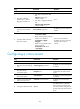
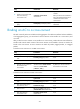
Ste
p
Command
Remarks
1. Enter system view.
system-view N/A
2. Enter Layer 2 Ethernet
interface view or Layer 2
aggregate interface view.
• Enter Layer 2 Ethernet interface
view:
interface interface-type
interface-number
• Enter Layer 2 aggregate interface
view:
interface bridge-aggregation
interface-number
N/A
3. Create a service instance
and enter service instance
view.
service-instance instance-id
By default, no service instance is
created.
4. Configure match criteria for
the service instance.
• Match all incoming packets:
encapsulation default
• Match incoming packets with any
VLAN ID or no VLAN ID:
encapsulation { tagged |
untagged }
• Match incoming packets with a
specific VLAN ID:
encapsulation s-vid vlan-id
[ only-tagged ]
Use one of the commands.
By default, no match criteria are
configured for the service
instance.
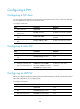
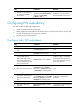
Configuring a cross-connect
Ste
p
Command
Remarks
1. Enter system view.
system-view N/A
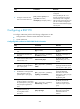
2. Create a cross-connect group
and enter cross-connect group
view.
xconnect-group group-name
By default, no cross-connect group
is created.
3. (Optional.) Configure a
description for the
cross-connect group.
description text
By default, no description is
configured for the cross-connect
group.
4. (Optional.) Enable the
cross-connect group.
undo shutdown
By default, the cross-connect group
is enabled.
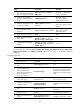
5. Create a cross-connect and
enter cross-connect view.
connection connection-name
By default, no cross-connect is
created.
6. Configure an MTU for the PW.
mtu mtu
The default MTU is 1500 bytes.
The two PEs on an LDP PW must
have the same MTU configured for
the PW. Otherwise, the PW cannot
go up.