
R211x-HP Flexfabric 11900 MPLS Configuration Guide

248
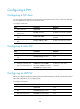
Configuring a PW
Configuring a PW class
You can configure PW attributes such as the PW type and enable control word in a PW class. PWs with
the same attributes can reference the same PW class.
To configure a PW class:
Ste
p
Command
Remarks
1. Enter system view.
system-view N/A
2. Create a PW class and enter
PW class view.
pw-class class-name By default, no PW class is created.
3. (Optional.) Enable control
word.
control-word enable
By default, control word is
disabled.
4. (Optional.) Specify the PW
type.
pw-type { ethernet | vlan } By default, the PW type is VLAN.
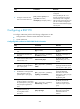
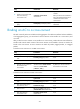
Configuring a static PW
Ste
p
Command
Remarks
1. Enter system view.
system-view N/A
2. Enter cross-connect group
view.
xconnect-group group-name N/A
3. Enter cross-connect view.
connection connection-name N/A
4. Configure a static PW and
enter cross-connect PW view.
peer ip-address pw-id pw-id
in-label label-value out-label
label-value [ pw-class class-name |
tunnel-policy tunnel-policy-name ] *
By default, no static PW is
configured.
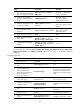
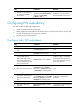
Configuring an LDP PW
Before you configure an LDP PW, enable global and interface MPLS LDP on the PE. For information about
MPLS LDP configuration, see "Configuring LDP."
T
o configure an LDP PW:
Ste
p
Command
Remarks
1. Enter system view.
system-view N/A
2. Enter cross-connect group
view.
xconnect-group group-name N/A
3. Enter cross-connect view.
connection connection-name N/A