
R211x-HP Flexfabric 11900 MPLS Configuration Guide

250
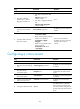
Ste
p
Command
Remarks
9. (Optional.) Configure the router
as a route reflector and specify a
peer or peer group as its client.
peer { group-name | ip-address }
reflect-client
By default, no route reflector
or client is configured.
10. (Optional.) Enable L2VPN
information reflection between
clients.
reflect between-clients
By default, L2VPN
information reflection is
enabled between clients.
11. (Optional.) Configure the cluster
ID of the route reflector.
reflector cluster-id { cluster-id |
ip-address }
By default, a route reflector
uses its own router ID as the
cluster ID.
12. (Optional.) Configure the
filtering of reflected L2VPN
information.
rr-filter extended-community-number
By default, the route reflector
does not filter reflected
L2VPN information.
13. (Optional.) Return to user view.
return N/A
14. (Optional.) Soft-reset L2VPN
BGP sessions.
refresh bgp { ip-address | all |
external | group group-name |
internal } { export | import } l2vpn
N/A
15. (Optional.) Reset L2VPN BGP
sessions.
reset bgp { as-number | ip-address |
all | external | group group-name |
internal } l2vpn
N/A
For more information about the peer as-number, peer enable, peer allow-as-loop, peer reflect-client,
reflect between-clients, and reflector cluster-id commands, see Layer 3—IP Routing Command
Reference.
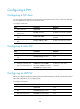
Creating a BGP PW
Ste
p
Command
Remarks
1. Enter system view.
system-view N/A
2. Enter cross-connect group
view.
xconnect-group group-name N/A
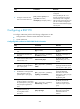
3. Configure the cross-connect
group to automatically
discover neighbors and
create PWs through BGP and
enter auto-discovery
cross-connect group view.
auto-discovery bgp
By default, a cross-connect group
does not automatically discover
neighbors or create PWs through
BGP.
4. Configure an RD for the
cross-connect group.
route-distinguisher
route-distinguisher
By default, no RD is configured for
the cross-connect group.
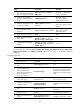
5. Configure route targets for the
cross-connect group.
vpn-target vpn-target&<1-8> [ both
| export-extcommunity |
import-extcommunity ]
By default, no route targets are
configured for the cross-connect
group.
6. (Optional.) Reference a PW
class.
pw-class class-name
By default, no PW class is
referenced.
7. (Optional.) Configure an
MTU for the PW.
mtu mtu The default MTU is 1500 bytes.
8. Create a local site and enter
site view.
site site-id [ range range-value ]
[ default-offset default-offset ]
By default, no local site is created.