
R211x-HP Flexfabric 11900 MPLS Configuration Guide


275
• Connect the two public tunnels on ASBR 2.
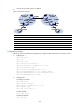
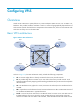
Figure 73 Network diagram
Device Interface IP address
Device
Interface
IP address
CE 1 Vlan-int10 100.1.1.1/24
A
SBR 1
Loop0
192.2.2.2/32
PE 1 Loop0 192.1.1.1/32 Vlan-int23 23.1.1.2/24
Vlan-int23 23.1.1.1/24
Vlan-int26 26.2.2.2/24
PE 2 Loop0 192.4.4.4/32
A
SBR 2
Loop0
192.3.3.3/32
Vlan-int22 22.2.2.1/24 Vlan-int26 26.2.2.3/24
CE 2 Vlan-int10 100.1.1.2/24
Vlan-int22 22.2.2.3/24
Configuration procedure
Before you perform the following configurations, configure VLANs and add ports to VLANs on CEs.
1. Configure CE 1.
<CE1> system-view
[CE1] vlan 10
[CE1-vlan10] quit
[CE1] interface vlan-interface 10
[CE1-Vlan-interface10] ip address 100.1.1.1 24
[CE1-Vlan-interface10] quit
[CE1] interface ten-gigabitethernet 1/0/1
[CE1-Ten-GigabitEthernet1/0/1] port link-type trunk
[CE1-Ten-GigabitEthernet1/0/1] port trunk permit vlan 10
[CE1-Ten-GigabitEthernet1/0/1] quit
2. Configure PE 1:
# Configure an LSR ID.
<PE1> system-view
[PE1] interface loopback 0
[PE1-LoopBack0] ip address 192.1.1.1 32
[PE1-LoopBack0] quit
[PE1] mpls lsr-id 192.1.1.1
# Enable L2VPN.
[PE1] l2vpn enable
# Enable global LDP.
[PE1] mpls ldp