
R211x-HP Flexfabric 11900 MPLS Configuration Guide

21
Tasks at a
g
lance
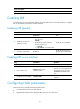
(Optional.) Enabling SNMP notifications for LDP
Enabling LDP
To enable LDP, you must enable LDP globally, and then enable LDP on relevant interfaces or configure
IGP to automatically enable LDP on those interfaces.
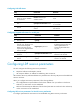
Enabling LDP globally
Ste
p
Command
Remarks
1. Enter system view.
system-view N/A
2. Enable LDP for the local
node or for a VPN.
• Enable LDP for the local node and
enter LDP view:
mpls ldp
• Enable LDP for a VPN and enter
LDP-VPN instance view:
a. mpls ldp
b. vpn-instance vpn-instance-name
By default, LDP is disabled.
3. Configure an LDP LSR ID.
lsr-id lsr-id
By default, the LDP LSR ID is
the same as the MPLS LSR ID.
Enabling LDP on an interface
Ste
p
Command
Remarks
1. Enter system view.
system-view N/A
2. Enter interface view.
interface interface-type
interface-number
If the interface is bound to a VPN
instance, you must enable LDP for
the VPN instance by using the
vpn-instance command in LDP
view.
3. Enable LDP on the interface.
mpls ldp enable
By default, LDP is disabled on an
interface.
Configuring Hello parameters
Perform this task to configure the following hello timers:
• Link Hello hold time and Link Hello interval
• Targeted Hello hold time and Targeted Hello interval for a specific peer