
R211x-HP Flexfabric 11900 MPLS Configuration Guide

285
Before you perform this task, configure an LSR ID for the PE with the mpls lsr-id command, and enable
MPLS with the mpls enable command on the backbone interface of the PE. For more information about
these commands, see MPLS Command Reference.
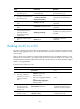
To enable L2VPN:
Ste
p
Command
Remarks
1. Enter system view.
system-view N/A
2. Enable L2VPN.
l2vpn enable By default, L2VPN is disabled.
Configuring an AC
An AC is a service instance on a Layer 2 Ethernet interface or Layer 2 aggregate interface. The AC
forwards packets that are received on the interface and meet the match criteria of the service instance to
the bound VSI.
On a PE, configure a service instance on the Layer 2 Ethernet interface or Layer 2 aggregate interface
that connects to a CE to match packets for the AC.
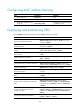
To configure a service instance:
Ste
p
Command
Remarks
1. Enter system view.
system-view N/A
2. Enter Layer 2 Ethernet
interface view or Layer 2
aggregate interface view.
• Enter Layer 2 Ethernet interface
view:
interface interface-type
interface-number
• Enter Layer 2 aggregate
interface view:
interface bridge-aggregation
interface-number
N/A
3. Create a service instance
and enter service instance
view.
service-instance instance-id
By default, no service instance is
created.
4. Configure match criteria for
the service instance.
• Match all incoming packets:
encapsulation default
• Match incoming packets with
any VLAN ID or no VLAN ID:
encapsulation { tagged |
untagged }
• Match incoming packets with a
specific VLAN ID:
encapsulation s-vid vlan-id
[ only-tagged ]
Use one of the commands.
By default, no match criteria are
configured for the service instance.