
R211x-HP Flexfabric 11900 MPLS Configuration Guide

286
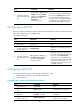
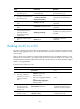
Configuring a VSI
Ste
p
Command
Remarks
1. Enter system view.
system-view N/A
2. Create a VSI and enter VSI
view.
vsi vsi-name By default, no VSI is created.
3. (Optional.) Configure a
description for the VSI.
description text
By default, no description is
configured for a VSI.
4. (Optional.) Configure the
default PW ID for the VSI.
default-pw-id default-pw-id
By default, no default PW ID is
configured for the VSI.
5. Configure an MTU for the VSI.
mtu mtu
By default, the MTU of a VSI is
1500 bytes.
6. (Optional.) Enable the VSI.
undo shutdown By default, a VSI is enabled.
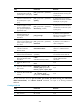
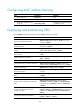
Configuring a PW
Configuring a PW class
In a PW class, you can configure PW attributes such as the PW type. To simplify PW configuration, you
can configure PWs with the same attributes by referencing the same PW class.
To configure a PW class:
Ste
p
Command
Remarks
1. Enter system view.
system-view
N/A
2. Create a PW class and enter
PW class view.
pw-class class-name By default, no PW class is created.
3. (Optional.) Specify the PW
type.
pw-type { ethernet | vlan } By default, the PW type is VLAN.
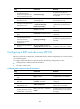
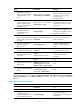
Configuring a static PW
Ste
p
Command
Remarks
1. Enter system view.
system-view N/A
2. Enter VSI view.
vsi vsi-name N/A
3. Specify static signaling
for PWs, and enter VSI
static view.
pwsignaling static
By default, no PW signaling protocol is
specified.