
R211x-HP Flexfabric 11900 MPLS Configuration Guide

291
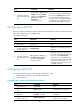
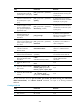
Ste
p
Command
Remarks
4. Configure an RD for the
auto-discovery VSI.
route-distinguisher
route-distinguisher
By default, no RD is configured for
the auto-discovery VSI.
5. Configure route targets for the
auto-discovery VSI.
vpn-target vpn-target&<1-8> [ both
| export-extcommunity |
import-extcommunity ]
By default, no route targets are
configured for the auto-discovery
VSI.
6. (Optional.) Reference a PW
class.
pw-class class-name
By default, no PW class is
referenced.
7. (Optional.) Reference a tunnel
policy.
tunnel-policy tunnel-policy-name
By default, no tunnel policy is
referenced.
8. Use LDP to create a PW to an
automatically discovered
remote PE and enter
auto-discovery VSI LDP
signaling view.
signaling-protocol ldp
By default, no signaling protocol is
specified.
9. Configure a VPLS ID for the
VSI.
vpls-id vpls-id
By default, no VPLS ID is
configured.
Binding an AC to a VSI
This task is mutually exclusive from Ethernet link aggregation. If a Layer 2 Ethernet interface has been
added to a link aggregation group, you cannot bind a service instance on the Layer 2 interface to a VSI,
and vice versa.
After you bind a service instance on a Layer 2 Ethernet interface or Layer 2 aggregate interface to a VSI,
packets that are received from the interface and meet the match criteria of the service instance are
forwarded based on the MAC address table of the VSI. A service instance can match all packets, tagged
packets, or untagged packets.
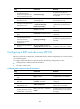
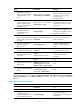
To bind a service instance to a VSI:
Ste
p
Command
Remarks
1. Enter system view.
system-view N/A
2. Enter Layer 2 Ethernet
interface view or Layer 2
aggregate interface
view.
• Enter Layer 2 Ethernet interface view:
interface interface-type
interface-number
• Enter Layer 2 aggregate interface
view:
interface bridge-aggregation
interface-number
N/A
3. Create an Ethernet
service instance and
enter Ethernet service
instance view.
service-instance instance-id
By default, no Ethernet service
instance exists on the interface.
4. Bind the Ethernet service
instance to a VSI.
xconnect vsi vsi-name [ access-mode
{ ethernet | vlan } ]
By default, a service instance is
not bound to any VSI.