
R211x-HP Flexfabric 11900 MPLS Configuration Guide


293
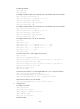
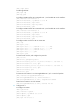
Task Command
Display BGP L2VPN update group
information.
display bgp update-group l2vpn [ ip-address ]
Clear MAC address entries for one or all VSIs.
reset l2vpn mac-address [ vsi vsi-name ]
Reset L2VPN BGP sessions.
reset bgp { as-number | ip-address | all | external | group
group-name | internal } l2vpn
VPLS configuration examples
Static PW configuration example
Network requirements
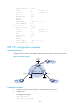
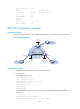
Configure VPLS on each PE, and establish static PWs between the PEs to interconnect the CEs.
Figure 76 Network diagram
Configuration procedure
This task includes the following configurations:
• Configure basic MPLS on each PE: configure LSR ID, enable LDP, run IGP (OSPF in this example) to
establish LSPs.
• Establish static PWs: enable L2VPN, create static PWs, and specify labels.
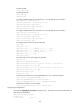
1. Configure PE 1:
# Configure an LSR ID.
<PE1> system-view
[PE1] interface loopback 0
[PE1-LoopBack0] ip address 1.1.1.9 32
[PE1-LoopBack0] quit
[PE1] mpls lsr-id 1.1.1.9
# Enable L2VPN.
[PE1] l2vpn enable
Loop0
1.1.1.9/32
XGE1/0/1 XGE1/0/1
CE 1
VPN 1
PE 1
PE 2
Loop0
2.2.2.9/32
CE 2
VPN 1
Loop0
3.3.3.9/32
PE 3
CE 3
VPN 1
XGE1/0/1
Vlan-int20 Vlan-int20
Vlan-int30
Vlan-int30 Vlan-int40
Vlan-int40