
R211x-HP Flexfabric 11900 MPLS Configuration Guide

325
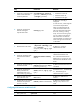
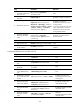
Configuring IBGP between an MCE and a PE
Ste
p
Command
Remarks
1. Enter system view.
system-view N/A
2. Enter BGP view.
bgp as-number N/A
3. Enter BGP-VPN instance
view.
ip vpn-instance vpn-instance-name N/A
4. Configure the PE as an
IBGP peer.
peer { group-name | ip-address } as-number
as-number
N/A
5. Enter BGP-VPN IPv4
unicast address family
view.
address-family ipv4 [ unicast ] N/A
6. Enable BGP to exchange
IPv4 unicast routes with
the peer.
peer { group-name | ip-address } enable
By default, BGP does not
exchange IPv4 unicast routes
with any peer.
7. Redistribute the VPN
routes of the VPN site.
import-route protocol [ process-id |
all-processes ] [ med med-value |
route-policy route-policy-name ] *
By default, no routes are
redistributed into BGP.
8. (Optional.) Configure
filtering of advertised
routes.
filter-policy { acl-number | prefix-list
prefix-list-name } export [ protocol
process-id ]
By default, BGP does not filter
advertised routes.
9. (Optional.) Configure
filtering of received
routes.
filter-policy { acl-number | prefix-list
prefix-list-name } import
Optional.
By default, BGP does not filter
received routes.
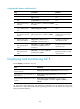
Displaying and maintaining MCE
Execute display commands in any view.
Task Command
Display information about a specified or
all VPN instances.
display ip vpn-instance [ instance-name vpn-instance-name ]
Display BGP peer group information for a
VPN instance.
display bgp group ipv4 vpn-instance vpn-instance-name
[ group-name ]
Display BGP peer information for a VPN
instance.
display bgp peer ipv4 vpn-instance vpn-instance-name
[ group-name log-info | ip-address { log-info | verbose } |
verbose ]
For other MCE related displaying and maintaining commands, such as displaying routing table
information for a VPN instance and maintaining routing sessions for a VPN instance, see Layer 3—IP
Routing Command Reference.