
R211x-HP Flexfabric 11900 MPLS Configuration Guide




336
Configuring IPv6 MCE
This chapter describes IPv6 MCE configuration.
Overview
In MPLS L3VPN networks, MCE uses static routes or dynamic routing protocols to advertise IPv4 routes
between internal networks and PEs and forwards IPv4 packets.
In IPv6 MPLS L3VPN networks, IPv6 MCE uses IPv6 static routes and dynamic routing protocols to
advertise IPv6 routes between internal networks and PEs and forwards IPv6 packets. The fundamentals
of IPv6 MCE are the same as those of MCE. For more information, see "MCE overview."
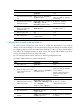
IPv6 MCE configuration task list
Tasks at a
g
lance
Configuring VPN instances:
1. (Required.) Creating a VPN instance
2. (R
equired.) Associating a VPN instance with an interface
3. (Optional.) Configuring route related attributes for a VPN instance
Configuring routing on an MCE:
• (Required.) Configuring routing between an MCE and a VPN site
• (Required.) Configuring routing between an MCE and a PE
Configuring VPN instances
VPN instances isolate VPN routes from public network routes and routes among VPNs. You must
configure VPN instances for an MCE networking scheme.
Creating a VPN instance
A VPN instance is associated with a site. It is a collection of the VPN membership and routing rules of its
associated site. A VPN instance does not necessarily correspond to one VPN.
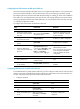
To create and configure a VPN instance:
Ste
p
Command
Remarks
1. Enter system view.
system-view N/A
2. Create a VPN instance and
enter VPN instance view.
ip vpn-instance vpn-instance-name
By default, no VPN instance is
created.
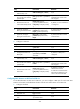
3. Configure an RD for the VPN
instance.
route-distinguisher
route-distinguisher
By default, no RD is specified.