
R211x-HP Flexfabric 11900 MPLS Configuration Guide


49
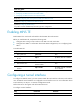
Ste
p
Command
Remarks
2. Create an MPLS TE tunnel
interface and enter tunnel
interface view.
interface tunnel tunnel-number
mode mpls-te
By default, no tunnel interface is
created.
3. Configure an IP address for
the tunnel interface.
ip address ip-address { mask-length
| mask }
By default, a tunnel interface does
not have an IP address.
4. Specify the tunnel destination
address.
destination ip-address
By default, no tunnel destination
address is specified.
Configuring an MPLS TE tunnel to use a static CRLSP
To configure an MPLS TE tunnel to use a static CRLSP, establish the static CRLSP, specify the MPLS TE
tunnel establishment mode as static, and configure the MPLS TE tunnel to reference the static CRLSP.
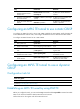
To configure an MPLS TE tunnel to use a static CRLSP:
Ste
p
Command
Remarks
1. Enter system view.
system-view N/A
2. Create a static CRLSP.
See "Configuring a static CRLSP."
N/A
3. Enter MPLS TE tunnel interface
view.
interface tunnel tunnel-number
[ mode mpls-te ]
Execute this command on the
ingress node.
4. Specify the MPLS TE tunnel
establishment mode as static.
mpls te signaling static
By default, MPLS TE uses RSVP-TE
to establish a tunnel.
5. Apply the static CRLSP to the
tunnel interface.
mpls te static-cr-lsp lsp-name
By default, a tunnel does not
reference any static CRLSP.
Configuring an MPLS TE tunnel to use a dynamic
CRLSP
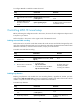
Configuration task list
Tasks at a
g
lance
(Required.) Establishing an MPLS TE tunnel by using RSVP-TE
(Optional.) Controlling MPLS TE tunnel setup
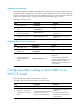
Establishing an MPLS TE tunnel by using RSVP-TE
Before you configure this task, you must use the rsvp command and the rsvp enable command to enable
RSVP on all nodes and interfaces that the MPLS TE tunnel traverses.
Perform this task on the ingress node of the MPLS TE tunnel.